
I have recently seen a few reports of clients missing the ability to create PDFs with e-signature via Adobe Acrobat Pro, even though they are paying for that feature.
After trying the usual fixes, i.e uninstall, re-install, customise the toolbar – I just couldn’t get it to appear.
We had the ability to use the e-sign feature via the web version, but lost the ability in the desktop application.
Diving through forums, we found the fix.
In Adobe, go to Preferences > Language
For the setting labelled Application Language: Make sure it is set to Same as the operating system.
If it’s set to English with Arabic Support – the e-sign feature goes missing.
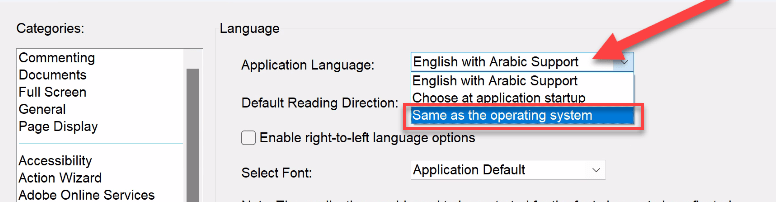
Once set the language and you have restarted the application, it should appear – you might be prompted that a feature is now available and restart via the prompt
 LRS Computers