
Uninstall Microsoft 365 (Office Applications)

When purchasing a new Windows computer from a manufacturer, mainly Dell – we have noticed that they like to install different language versions of Microsoft 365, and Microsoft OneNote.
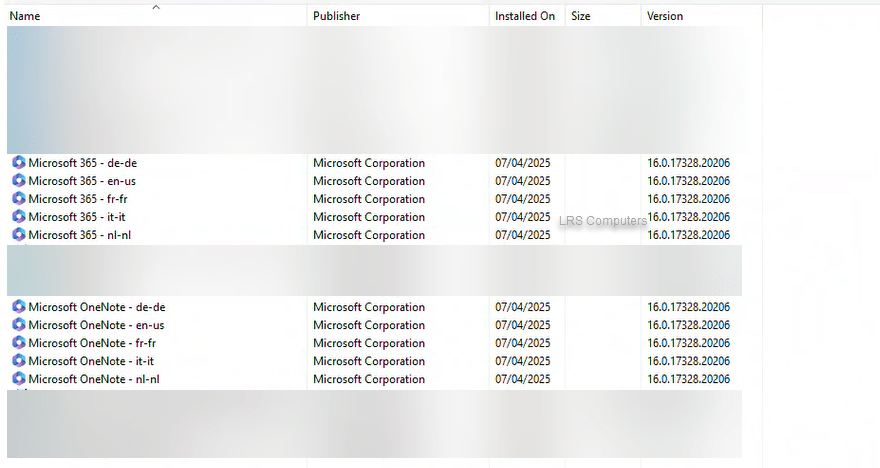
The above can be totally fine, but as premade computers from a manufacturer – they are often packed with bloatware and unnecessary applications.

As I mainly deal with computers for businesses and clients who have their Microsoft 365 subscription, we much prefer to uninstall the above and install a fresh copy of Microsoft 365 (Office) directly from their account / subscription.

We can uninstall directly from Control Panel, but each one can take 2-3 minutes.

In this post, I will show you how I uninstall all the above with a few clicks.

Read More »

M365 – Limit Access on Unmanaged Devices

In a dream world of IT, every device is managed, protected, encrypted and follows a Configuration Profile. However, we often come across clients, normally on the smaller side, who want their end users to be able to work on their own personal device. You can quite easily stipulate a BYOD Policy, but very often, they are simple and state, the device must have anti-virus, the device must have encryption and they must be up to date – they sign the Policy and no checks on the device itself have been carried out.

Below I’m going to go through the steps, that is put in place to limit access to the Web Apps only and prevent them from downloading files on their device and prevent them from signing into the Desktop Apps too.

Please note, to action these, you need Conditional Access, which is ‘locked’ behind a Microsoft Subscription. Having a Subscription such as Business Premium allows for Conditional Access.


Read More »